Skip to content

Enterprise solution

School managementmulti-school on one system

LMS for schools and multi-school operators

One system for school operations: curriculum, timetables, assessment, digital records and executive reporting.

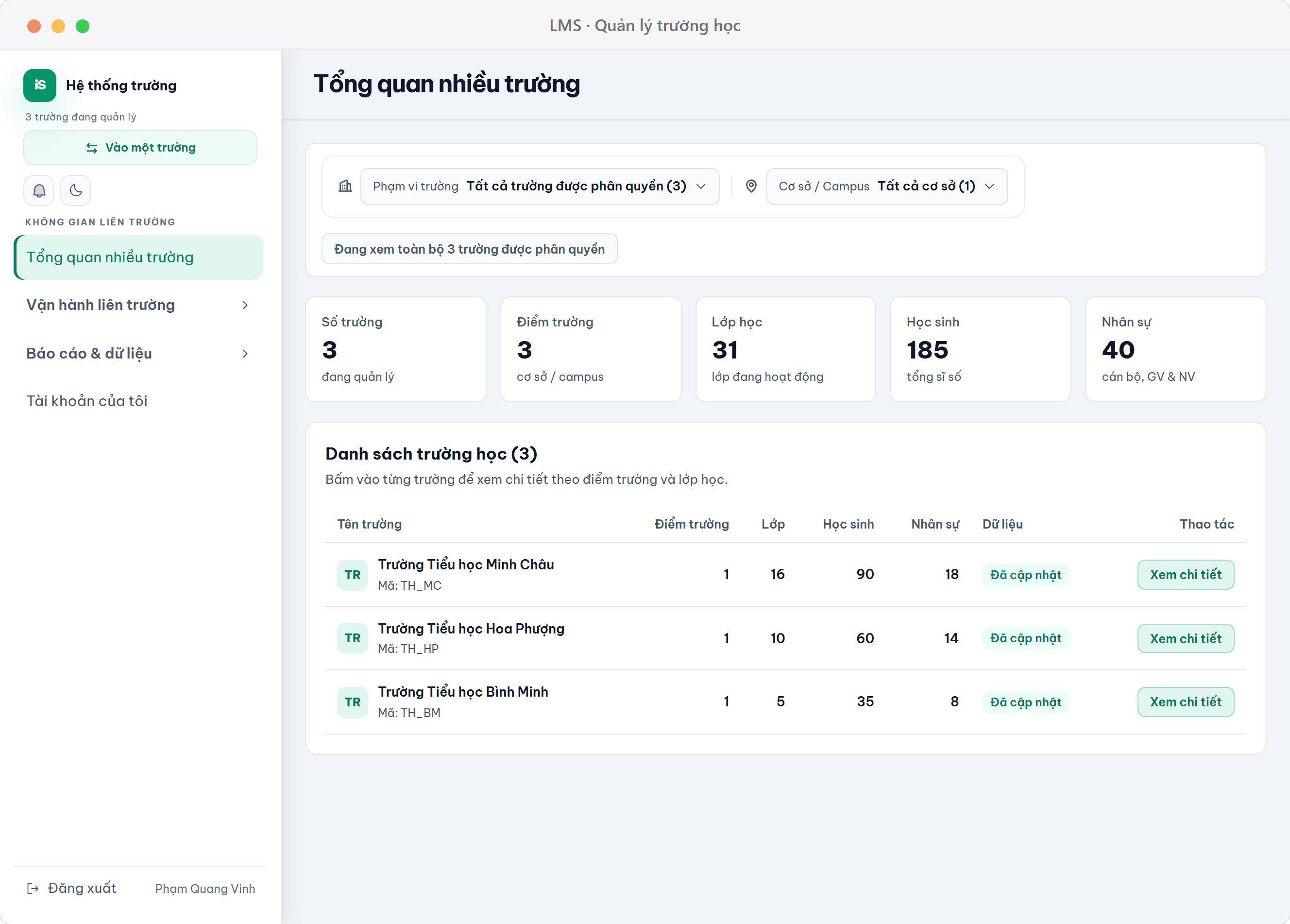
Multi-school overview: student, teacher and class figures for three schools
core feature groups
4
regulations built into the working screens
2
user groups
3

Challenge

  • Grades, timetables, records and administration sit in separate tools, with duplicated entry.
  • Digital records have several deadlines and a signing chain, which is error-prone and hard to trace.
  • Teachers must comment on every student, which takes a lot of time.

Solution

  • One admin account for many schools: see consolidated totals, then open each school.
  • Assessment follows the required steps, with an AI assistant suggesting comments.
  • Drag-and-drop timetables, digital lesson plans and digital records in one system.

Benefit

  • Bring grades, timetables, records and administration into one system.
  • Deadlines and the signing chain are built in, reducing mistakes.
  • Executive reports for the leadership team without manual compilation.
Features

Built on regulations and sector connections

  • Circular 27/2020 assessment

    The assessment screen follows four required stages: regular comments, periodic grading, competences and conduct, and final consolidation.

  • Digital records under Circular 70/2026

    Creation deadlines, homeroom-teacher and principal signing, publication and verification are built into the system.

  • Sector database linkage

    A dedicated admin area pushes school data to the sector database.

  • AI in daily workflow

    Suggests comment wording in the assessment screen, summarises minutes and drafts notices. Every AI use is logged.

In practice

Use cases and integrations

Use cases

  • A single primary school digitising its whole operation: grades, timetables, records and administration in one system.
  • An organisation managing several schools or campuses that needs one account to view cross-school totals and then each site.
  • A school that must strictly follow assessment and record regulations: deadlines, signing chain and publication built into the system.
  • A school that wants to cut teachers' comment-writing time: use the assistant to suggest comments right in the assessment screen.
  • A board of managers that needs fast operational reports: use dashboards and reports instead of gathering figures by hand.

Following regulations & sector connections

Unlike ordinary school administration software, sector regulations are built directly into the working screens instead of being an optional extra.

  • Circular 27/2020 — the student assessment screen: regular feedback, periodic assessment, competencies & qualities, consolidation & sign-off.
  • Circular 70/2026 — the digital records screen: creation deadlines, homeroom-teacher/board signing, publication and verification.
  • Sector database linkage — a dedicated admin section that pushes school data to the sector database.
  • Domain AI — an assistant for regulation Q&A, comment suggestions, minute summaries, notice drafting and early warnings, with an AI usage log.
FAQ

Frequently asked questions

How is this different from an online course platform?

This is a school operations system: curriculum, timetables, assessment, student records, administration and reporting. It is not an online quiz or assignment tool.

Can it run multiple schools?

Yes. A single administrator account can manage several schools and view cross-school totals.

Do assessment and student records follow the regulations?

Yes. Student assessment follows Circular 27/2020; digital student records follow Circular 70/2026.

What does the AI assistant do?

Suggests comment wording in the assessment screen, summarises minutes and drafts announcements. Usage is logged for review.

Who is it for?

Primary schools that want to digitise their whole operation, multi-school operators that need cross-school views, and school leadership that needs fast executive reporting.


See how the LMS would run your school

We set up a demo with a sample curriculum and timetable so you can see the interface you will use daily.

Book a demo

Get a consultation

Enter 2-100 characters.

Enter an email address so we can reply.

Enter 10-2000 characters.